issue with root user
Posted: 3. Jan 2026, 22:56
Happy new year!
As a perfect match I crashed my system around xmas. I tried to upgrade the kernel to the latest 5.15.x but it did not run through as the disk/partition was full. Then I tried to fix this the wrong way and ended up with a non booting system. I could not restore the old system, so I went for a new install. I installed via the standard iso on usb stick and upgraded everything short after that. I tried some icon sets and themes and then something strange happened:
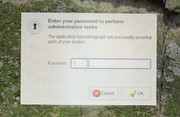
When I start i.e. gslpat I am prompted for the password. The screens becomes flickering and blurred and that prompt looks totally different to what it was before.
When the "root" application runs, the mouse pointer always shows ongoing action.
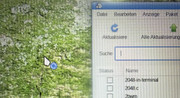
This is with any app requiring root privileges.
Also starting "root terminal" or "root terminal from here" does not work at all. If I need to run a command with root privileges, I need to open a normal terminal session and "sudo".
This is not the behaviour I had and I think it also not standard, but I have not yet found the setting/point/app... which will turn this back to normal.
Any hint?
As a perfect match I crashed my system around xmas. I tried to upgrade the kernel to the latest 5.15.x but it did not run through as the disk/partition was full. Then I tried to fix this the wrong way and ended up with a non booting system. I could not restore the old system, so I went for a new install. I installed via the standard iso on usb stick and upgraded everything short after that. I tried some icon sets and themes and then something strange happened:
When I start i.e. gslpat I am prompted for the password. The screens becomes flickering and blurred and that prompt looks totally different to what it was before.
When the "root" application runs, the mouse pointer always shows ongoing action.
This is with any app requiring root privileges.
Also starting "root terminal" or "root terminal from here" does not work at all. If I need to run a command with root privileges, I need to open a normal terminal session and "sudo".
This is not the behaviour I had and I think it also not standard, but I have not yet found the setting/point/app... which will turn this back to normal.
Any hint?
 ) and so far all is fine.